 BurtonSoftware
01 Operating Scenario
Definition: OMS stands for Order Management System. It centralizes multi-channel orders, products, inventory, fulfillment status, and operating data between sales channels and warehouse execution.
Purpose: OMS helps operators process orders, verify inventory, review shipment progress, trace exceptions, and export reports from one operational workspace.
02 Operating Guide
02.1 Initial Setup
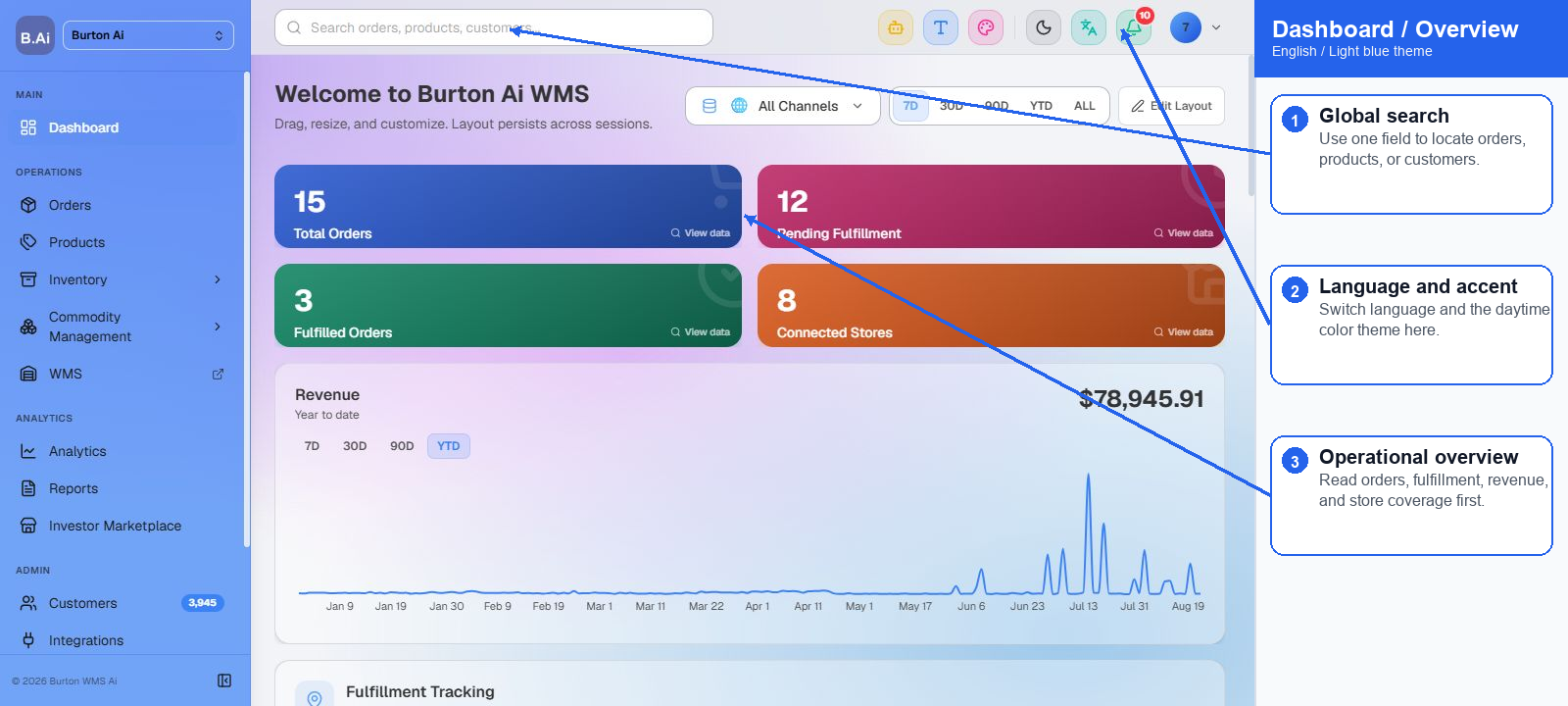
(1) Account login: Sign in with the assigned OMS account and confirm the workspace, language, light theme, and user permission scope.
(2) Workspace review: After entering the dashboard, confirm that the sidebar includes Dashboard, Orders, Products, Inventory, Analytics, Reports, Integrations, Activity Logs, and Help.
(3) Channel scope: Use the channel selector to review all channels or a specific store so that orders and inventory are interpreted under the correct channel scope.
(4) Date range: Select 7D, 30D, 90D, YTD, or ALL according to the operating review period.
02.2 Store Authorization
(1) Open Integrations to review channel connection status, sync time, authorization status, and exception notices.
(2) After authorization, OMS receives orders, products, customers, and fulfillment updates through webhooks or scheduled sync jobs.
(3) If orders do not appear as expected, check channel status, sync logs, and Activity Logs before re-authorizing.
02.3 Platform Order Processing Flow
(1) Imported orders are displayed with status, customer, channel, amount, shipping information, and fulfillment progress.
(2) Filter by status, channel, date, or keyword and prioritize unfulfilled, exception, and manual-review orders.
(3) Before fulfillment, verify SKU mapping, available inventory, customer data, address data, and channel-specific requirements.
(4) After fulfillment, OMS keeps shipment information for reporting, analytics, and support follow-up.
03 Supplemental Notes
OMS is the order operation entry point. It does not replace warehouse execution. Inventory adjustment, permission changes, channel reconnection, and write actions should be handled by authorized users with traceable records.
04 FAQ
| Question | Recommended Check |
|---|---|
| Menus are missing after login. | Check role, workspace access, and module permissions. |
| Dashboard data is empty. | Check channel, date range, sync jobs, and filters. |
| Order cannot move to fulfillment. | Check SKU mapping, available inventory, address data, and channel status. |